Most Frequently Asked JavaScript Interview Questions & Answers
Curated Most Frequently Asked JavaScript interview questions with detailed answers, grouped by topic. Search, revise and get interview-ready.
Most Frequently Asked JavaScript Interview Questions
Hoisting is JavaScript's behavior of processing declarations before executing the code. During the Creation Phase of the Execution Context, JavaScript allocates memory for variables and functions before any line of code runs. It is important to note that JavaScript does not physically move the code; hoisting is an internal behavior of the JavaScript engine.
There are two phases of JavaScript execution:
- Creation Phase
- Memory is allocated for variables and functions.
- Function declarations are stored completely in memory.
- Variables declared with
varare initialized withundefined. - Variables declared with
letandconstare hoisted but remain uninitialized.
- Execution Phase
- JavaScript executes the code line by line.
- Variable assignments happen during this phase.
Hoisting with var
console.log(a); // undefined

var a = 10;

console.log(a); // 10
The declaration is hoisted, but the assignment remains in its original place. Internally, JavaScript behaves like:
var a = undefined;

console.log(a);

a = 10;

console.log(a);
Hoisting with let
console.log(age);

let age = 25;
Output:
ReferenceError: Cannot access 'age' before initializationAlthough let is hoisted, it stays uninitialized until its declaration is reached.
Hoisting with const
console.log(PI);

const PI = 3.14;
Output:
ReferenceError: Cannot access 'PI' before initializationTemporal Dead Zone (TDZ)
The Temporal Dead Zone (TDZ) is the period between entering a scope and the execution of a let or const declaration. Accessing the variable during this period results in a ReferenceError.
Function Declaration Hoisting
Function declarations are fully hoisted.
greet();

function greet() {
  console.log("Hello");
}
Output:
HelloFunction Expression Hoisting
Function expressions follow the hoisting behavior of the variable used to store them.
Using var:
greet();

var greet = function () {
  console.log("Hello");
};
Output:
TypeError: greet is not a functionBecause:
var greet = undefined;

greet();

greet = function () {
  console.log("Hello");
};
Using let or const:
greet();

let greet = function () {
  console.log("Hello");
};
Output:
ReferenceErrorSummary
- var → Hoisted and initialized with
undefined. - let → Hoisted but remains in the Temporal Dead Zone until initialized.
- const → Hoisted but remains in the Temporal Dead Zone until initialized.
- Function Declarations → Fully hoisted and can be called before their declaration.
- Function Expressions → Hoisted according to the variable (
var,let, orconst) used to store them.
var, let, and const are used to declare variables in JavaScript, but they differ mainly in scope, hoisting, redeclaration, and reassignment.
- var — Function-scoped, hoisted and initialized with
undefined. It can be redeclared and reassigned. - let — Block-scoped and hoisted, but remains in the Temporal Dead Zone (TDZ) until initialized. It can be reassigned but cannot be redeclared in the same scope.
- const — Block-scoped and also remains in the TDZ until initialized. It cannot be redeclared or reassigned and must be initialized when declared.
var a = 10;
var a = 20; // ✅ Redeclaration allowed

let b = 10;
b = 20;     // ✅ Reassignment allowed

const c = 10;
// c = 20;  // ❌ Reassignment not allowed
In modern JavaScript, prefer `const` by default, use `let` when reassignment is required, and generally avoid `var` because of its function-scoping behavior.
undefined means a variable has been declared but never assigned a value — it is also what a missing function argument or a nonexistent object property evaluates to. null is an explicit value a developer assigns to represent "intentionally empty" or "no value here." They are similar but distinct: typeof undefined is "undefined", while typeof null is "object" (a long-standing language quirk), and null == undefined is true under loose equality even though null === undefined is false.
A closure is a function that remembers and can access variables from its surrounding (lexical) scope, even after the outer function has finished executing.
A practical example is a counter:
function createCounter() {
  let count = 0;

  return () => ++count;
}

const counter = createCounter();

console.log(counter()); // 1
console.log(counter()); // 2
console.log(counter()); // 3
When createCounter() runs, it creates the count variable and returns an inner function. Even after createCounter() has finished executing, the returned function still has access to count because of the closure. Each time counter() is called, it accesses and updates the same count variable.
Benefits of Closures
- Data privacy: Variables can be kept private and accessed only through specific functions.
- State preservation: A closure can remember and maintain data between function calls.
- Reusability: Closures can be used to create reusable function factories.
- Useful for callbacks: They allow functions such as event handlers and callbacks to remember required variables.
Closures are commonly used for private state, counters, function factories, callbacks, and maintaining data between function calls.
A callback function is a function that is passed as an argument to another function and is executed later when needed.
Callbacks are commonly used for asynchronous operations, event handling, and array methods.
function greet(name, callback) {
  console.log(`Hello, ${name}`);
  callback();
}

function sayBye() {
  console.log("Goodbye!");
}

greet("John", sayBye);
Here, sayBye is passed to greet() as a callback. The greet() function calls it after completing its own task.
Callbacks are also commonly used with asynchronous operations:
setTimeout(() => {
  console.log("Data received");
}, 2000);
The function passed to setTimeout() is a callback that runs after the timer finishes.
Callbacks are useful for:
- Handling asynchronous operations
- Event handling
- Array methods such as
map(),filter(), andforEach() - Executing a function after another function completes
When many asynchronous callbacks are nested inside each other, the code can become difficult to read and maintain. This is known as callback hell, which is one reason Promises and async/await are commonly used.
The key idea is: A callback is a function passed to another function so that it can be executed later.
this refers to the object associated with the current function call. Its value is mainly determined by how the function is called, not where it is defined.
- Called as
obj.method()→thisrefers toobj. - Called as a plain function →
thisisundefinedin strict mode (or the global object otherwise). - Called with
new→thisrefers to the newly created object. - Called with
.call(),.apply(), or.bind()→thiscan be explicitly set. - Arrow functions do not have their own
this; they inheritthisfrom their surrounding lexical scope.
Normal Function
const user = {
  name: "John",

  greet: function () {
    console.log(this.name);
  }
};

user.greet(); // John
Here, greet() is called as user.greet(), so this refers to the user object.
Arrow Function
const user = {
  name: "John",

  greet: () => {
    console.log(this.name);
  }
};

user.greet(); // undefined
The arrow function does not create its own this. It inherits this from its surrounding scope, so user.greet() does not make this refer to user.
A common practical use of arrow functions is inside callbacks:
const user = {
  name: "John",

  greet: function () {
    setTimeout(() => {
      console.log(this.name);
    }, 1000);
  }
};

user.greet(); // John
Here, the normal greet function gets this from user, and the arrow function inside setTimeout inherits that same this.
The key difference is: normal functions get `this` based on how they are called, while arrow functions inherit `this` from their surrounding scope.
Q7. What is the event loop, and how does JavaScript handle asynchronous operations on a single thread?
JavaScript is single-threaded, which means it can execute one piece of JavaScript code at a time through the Call Stack. However, it can handle asynchronous operations such as timers, API requests, and DOM events using the Web APIs, Task Queues, and Event Loop provided by the surrounding environment.
The Event Loop continuously monitors the Call Stack and the task queues. When an asynchronous operation is completed, its callback is placed into the appropriate queue. When the Call Stack becomes empty, the Event Loop moves the callback back to the Call Stack so it can be executed.
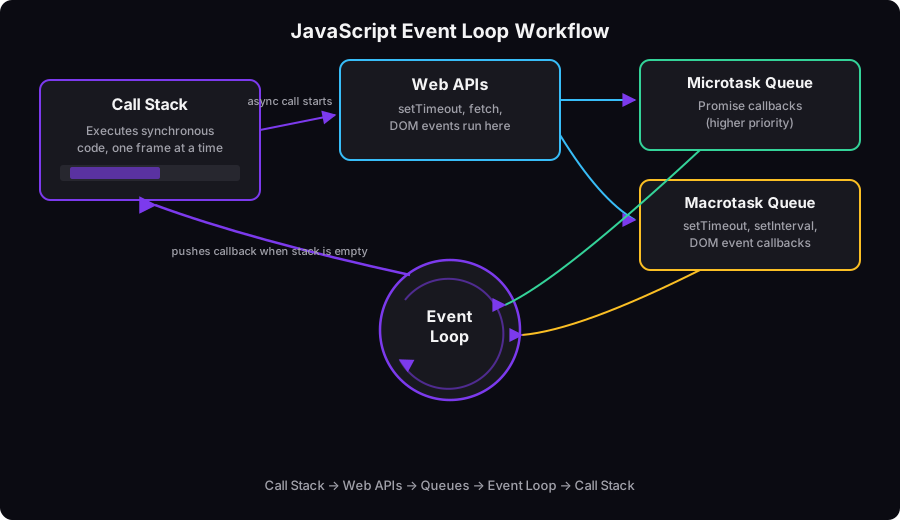
How the Event Loop Works
1. Call Stack — Synchronous JavaScript code is executed here, one operation at a time.
2. Web APIs — When an asynchronous operation such as setTimeout(), fetch(), or a DOM event starts, the browser or Node.js environment handles that operation outside the Call Stack.
3. Microtask Queue — When a Promise is resolved, its callback is placed in the Microtask Queue. Microtasks have higher priority and are processed before the next macrotask.
4. Macrotask Queue — Callbacks from operations such as setTimeout(), setInterval(), and many DOM events are placed in the task/macrotask queue.
5. Event Loop — The Event Loop continuously checks whether the Call Stack is empty. If it is empty, it takes the next available callback from the queues and pushes it onto the Call Stack for execution.
For example:
console.log("Start");

setTimeout(() => {
  console.log("Timeout");
}, 0);

Promise.resolve().then(() => {
  console.log("Promise");
});

console.log("End");
The output is:
Start
End
Promise
Timeout
Here, Start and End execute immediately on the Call Stack. The setTimeout() callback goes to the Macrotask Queue, while the Promise callback goes to the Microtask Queue. Once the Call Stack becomes empty, the Event Loop processes the Microtask Queue first, so Promise runs before Timeout.
The important flow to remember is: Call Stack → Web APIs → Queues → Event Loop → Call Stack. This mechanism allows JavaScript to handle asynchronous operations without blocking its single execution thread.
Prototypal inheritance is a mechanism in JavaScript where an object can inherit properties and methods from another object through its prototype.
Every JavaScript object has an internal link to another object called its prototype. When JavaScript tries to access a property or method, it first looks on the object itself. If it is not found, JavaScript searches the object's prototype, then the prototype's prototype, and so on until it finds the property or reaches null. This is called the prototype chain.
For example:
const animal = {
  speak() {
    return "Animal speaks";
  }
};

const dog = Object.create(animal);

console.log(dog.speak()); // Animal speaks
Here, dog does not have its own speak() method. JavaScript cannot find it on dog, so it looks at dog's prototype, which is animal, and finds the method there.
This is also how built-in objects work. For example, an array can use methods such as map(), filter(), and push() because those methods are available through Array.prototype rather than being copied into every individual array.
Prototypal inheritance can be created using Object.create(), constructor functions with .prototype, or modern class syntax. Classes provide a cleaner syntax, but internally JavaScript still uses the prototype system.
The key idea is: If a property is not found on an object, JavaScript looks for it in its prototype chain.
A Promise is an object that represents the eventual result of an asynchronous operation. It allows JavaScript to handle asynchronous operations such as API requests, timers, and file operations without blocking the main thread.
A Promise has three states:
- Pending — The operation is still in progress.
- Fulfilled — The operation completed successfully.
- Rejected — The operation failed.
You can handle a Promise using .then() for a successful result and .catch() for errors:
const promise = new Promise((resolve, reject) => {
  const success = true;

  if (success) {
    resolve("Data received");
  } else {
    reject("Something went wrong");
  }
});

promise
  .then((result) => console.log(result))
  .catch((error) => console.log(error));
Promises make asynchronous code easier to read and manage compared to deeply nested callbacks (callback hell). They also support chaining and can be combined using methods such as Promise.all(), Promise.race(), and Promise.allSettled(). Promises are also the foundation of async/await.
A shallow copy creates a new object but does not create copies of nested objects or arrays. Instead, nested reference values are still shared between the original and copied object. A deep copy creates a completely independent copy, including all nested objects and arrays, so changes to the copy do not affect the original.
Shallow Copy
A shallow copy copies the top-level properties, but nested objects still point to the same reference.
const user = {
  name: "John",
  address: {
    city: "Delhi"
  }
};

const copy = { ...user };

copy.address.city = "Mumbai";

console.log(user.address.city); // Mumbai
Here, copy is a new object, but user.address and copy.address refer to the same nested object. Therefore, changing the nested property affects both objects.
Deep Copy
A deep copy creates new references for nested objects and arrays as well.
const user = {
  name: "John",
  address: {
    city: "Delhi"
  }
};

const copy = structuredClone(user);

copy.address.city = "Mumbai";

console.log(user.address.city); // Delhi
Here, copy and user have completely separate nested objects, so changing the copy does not affect the original.
Common Ways to Create Copies
- Shallow copy: Spread syntax (
{ ...obj }),Object.assign(),slice(), and similar methods. - Deep copy:
structuredClone()is the modern built-in option for many data types. JSON serialization (JSON.parse(JSON.stringify(obj))) can also create a deep copy for simple JSON-compatible data, but it has limitations with values such as functions,undefined,Date,Map, andSet.
The key difference is: A shallow copy shares nested references with the original, while a deep copy creates independent nested values.
Both debouncing and throttling are techniques used to control how frequently a function executes when an event occurs repeatedly. They are commonly used with events such as typing, scrolling, resizing, mouse movement, and API requests.
Debouncing
Debouncing delays the execution of a function until a specified amount of time has passed without the event occurring again. Every new event resets the timer.
In simple terms: wait until the user stops doing something, then execute the function.
For example, consider a search box. If a user types JavaScript quickly, we don't want to make an API request for every character. Debouncing waits until the user stops typing for a certain amount of time and then makes one API request.
Typing:  J → Ja → Jav → Java → JavaS → JavaScript
                                     ↓
                              User stops typing
                                     ↓
                                  Execute
Use debouncing when you only need the final result after a burst of activity. Common use cases include search suggestions, autocomplete, form validation, and API calls triggered by user input.
Throttling
Throttling limits a function so that it can execute at most once within a specified time interval, even if the event continues to occur.
In simple terms: keep executing, but only at a controlled frequency.
For example, while scrolling a page, the scroll event can fire many times per second. Instead of running the handler for every event, throttling can allow it to run once every 200ms.
Scrolling:  ↓ ↓ ↓ ↓ ↓ ↓ ↓ ↓ ↓ ↓ ↓ ↓
           │     │     │     │
           ↓     ↓     ↓     ↓
        Execute Execute Execute Execute
Use throttling when you need regular updates while an activity is continuously happening. Common use cases include scroll handlers, mouse movement, window resizing, drag events, and tracking user interactions.
Main Difference
| Debouncing | Throttling | |---|---| | Waits for activity to stop | Runs at controlled intervals | | Executes after the final event | Executes periodically during the activity | | Best for search and input events | Best for scroll and mouse events | | Useful when only the final result matters | Useful when continuous updates are needed |
Easy Way to Remember
Debounce: Wait → Wait → Wait → Execute
Throttle: Execute → Wait → Execute → Wait → Execute
The key difference is that debouncing waits for a pause in activity, while throttling limits execution to a fixed interval during continuous activity.